

Team and roles
Every project has one team: a lead and up to seven teammates. Each teammate is an AI agent with a name, a role, strengths, an agent and model, and notes it keeps across cards.
Setting up the team
The first time you open a project, Tutti suggests a team from what's in it: a Django and Vite app gets a lead, backend and frontend developers, a tester and a reviewer; an empty marketing workspace gets a researcher, a copywriter and an editor. Rename them, change roles and strengths, add photos, add or remove teammates, and save.
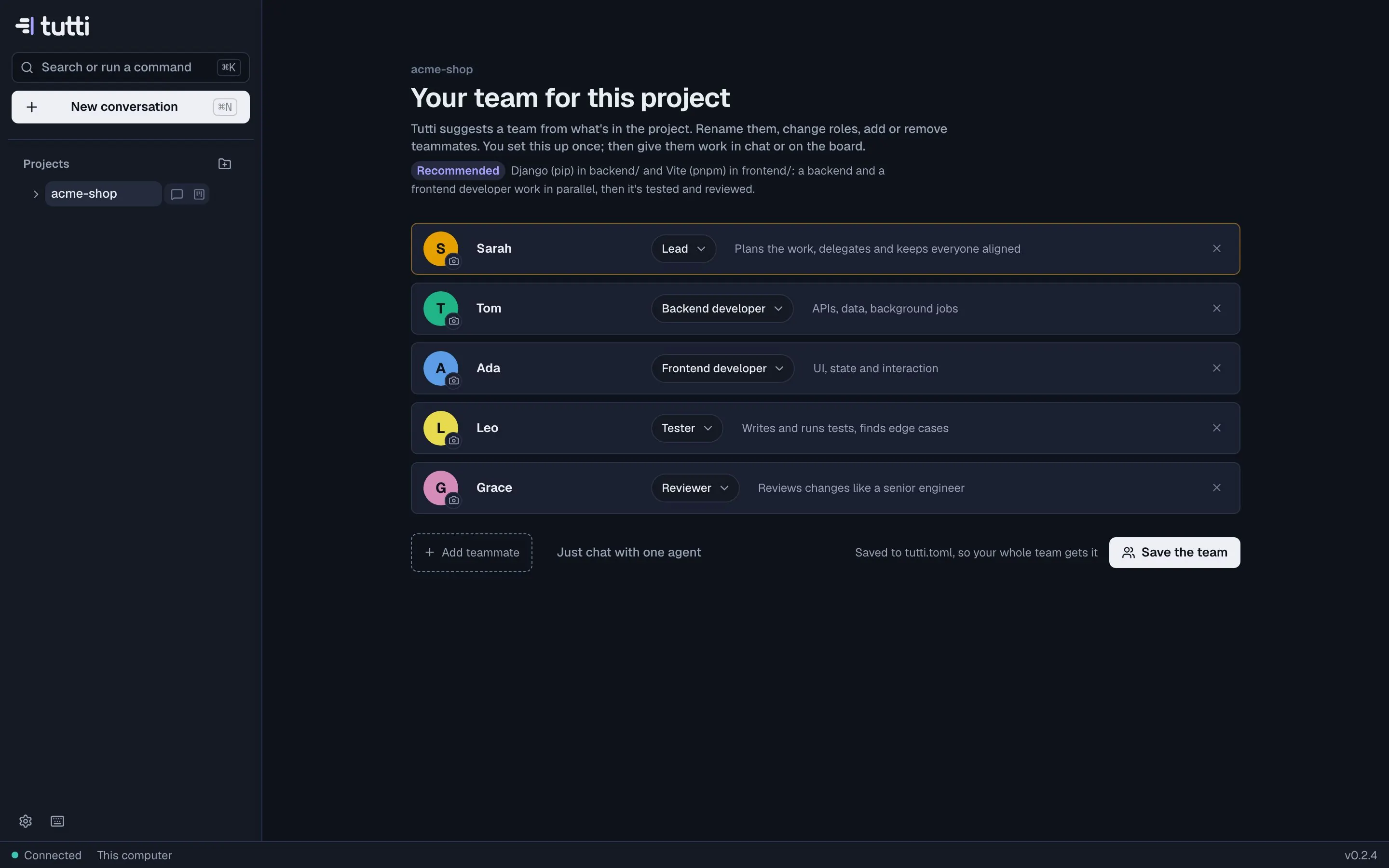
You can change the team any time in the Team view, or in [team] in tutti.toml. Teams need
Claude Code or Codex installed.
Roles
A role tells a teammate what it's for and how to work. The built-in roles:
- Software: lead, developer, backend, frontend, tester, reviewer, security reviewer, docs, investigator, upgrade specialist.
- Marketing, sales and research: researcher, copywriter, editor, SEO, outreach writer (SDR), analyst.
Reviewers and security reviewers prefer a different vendor's model than the builders, so you get an independent second opinion. Write a teammate's strengths in plain words ("APIs and payments; careful with migrations"); they're part of its instructions and help the lead decide who takes what.
Ready-made teams
| For | Team | What it's good at |
|---|---|---|
| Software | Feature squad | A lead, two developers, a tester and a reviewer for a well-scoped feature |
| Software | Full-stack feature | Backend and frontend in parallel, tested and reviewed |
| Software | Bug hunt | Reproduce, find the root cause, fix and prove it with a test |
| Software | Review panel | Independent reviews of a branch from different models |
| Software | Test backfill | Raise coverage where it matters, without touching behaviour |
| Software | Upgrade crew | Framework or dependency upgrades, step by step, kept green |
| Marketing | Campaign team | Research the audience, write the campaign, edit it into shape |
| Marketing | Content studio | Articles and pages that are researched, written, optimised and edited |
| Marketing | Launch kit | Everything a launch needs: page, announcement, posts and FAQ |
| Sales | Outreach team | Research prospects and draft personal first messages and follow-ups |
| Sales | Proposal team | A tailored proposal or RFP answer, researched and checked |
| Research | Research desk | Parallel research with a written summary and numbers |
Set project.team in tutti.toml to suggest a specific one (for example feature-squad or campaign).
Teammates' memory
Each teammate keeps notes across cards: how to run your tests, where things live, what you prefer. They add a note when they learn something worth keeping, and Tutti asks them to when you approve a card. Every new note shows on the card ("Tom remembered …") with Undo. Open a teammate to read and edit everything they know, and to see their history of finished cards.
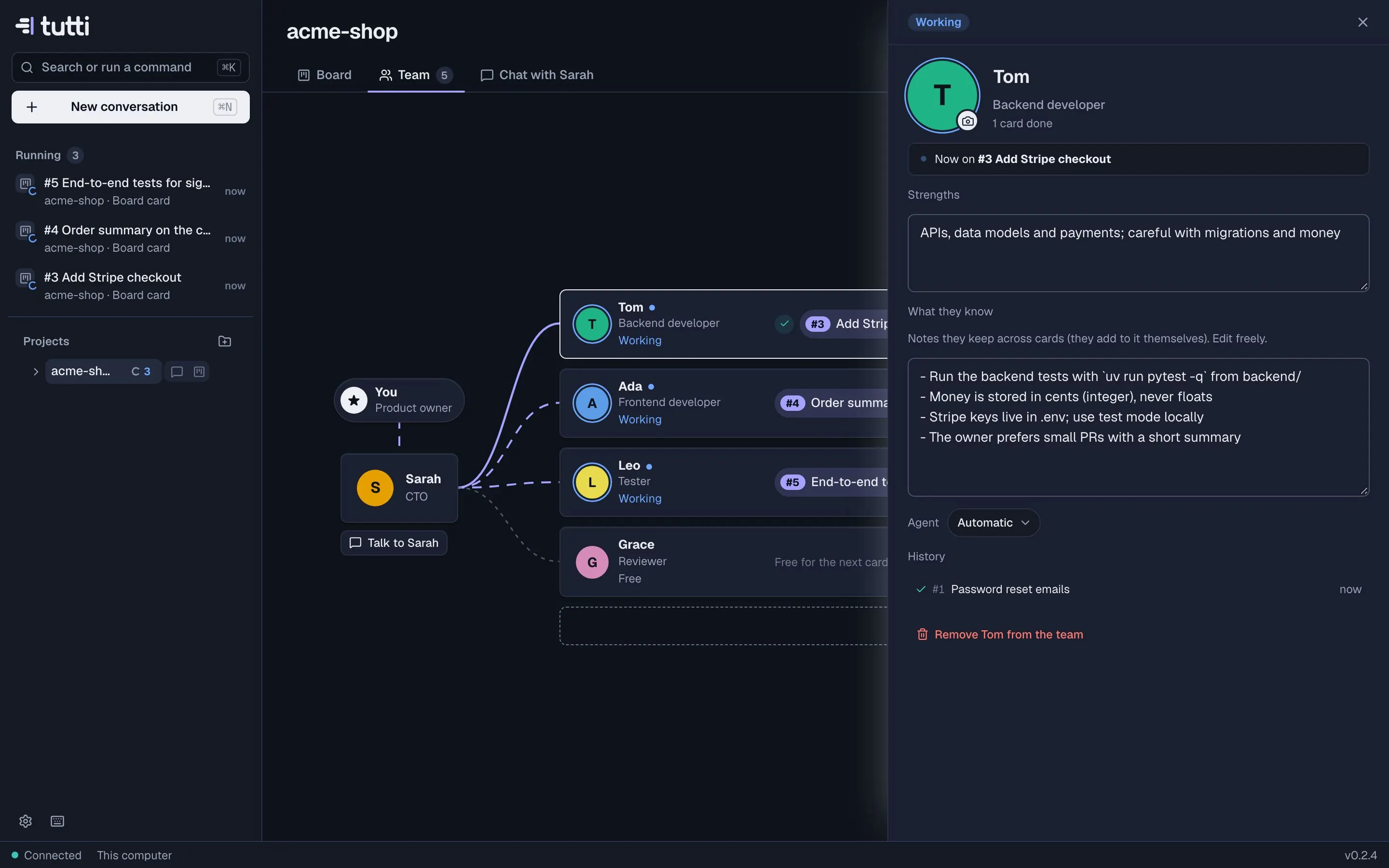
Names, roles and strengths are shared through tutti.toml. Notes and history stay on your machine.
Agents and models
Each teammate can use a different agent and model: a strong model for the lead, a fast one for tests, another vendor for review. Leave it on Automatic and Tutti picks the agent from the role and your defaults in Settings.
A growing team
When the work needs it, the lead can add a teammate (for example a security reviewer for an auth change), up to 8 members. Every addition shows in the team's hand-offs with a reason. Turn this off in Settings with Let team leads add members.
The same team in your other tools
When you save the team, Tutti also writes it to a managed section of AGENTS.md (read by Codex, Cursor,
Gemini CLI and others) and to one Claude Code subagent per teammate in .claude/agents/. If a project
already has Claude Code subagents but no Tutti team, Tutti suggests them as the team.
Company teams
On the Team plan, you can share a project's team with your company and start other projects from a company team.
Something missing or unclear? Ask us, and we'll answer and improve this page.